How to Download & Install Sleek Bill on Desktop
System Requirements and Installation Guide for Sleek Bill
Getting started with Sleek Bill is quick and easy. The software is designed to run smoothly on almost every Windows computer, so you don't need any advanced hardware or technical expertise to install it.
System Requirements
Sleek Bill is compatible with all major Windows operating systems, including:
- Windows XP
- Windows Vista
- Windows 7
- Windows 8 and 8.1
- Windows 10
- Windows 11
No special hardware or high-end configuration is required. If your computer can run Windows, it can run Sleek Bill.
Step 1: Download Sleek Bill
Open your preferred web browser and visit www.billingsoftware.in.
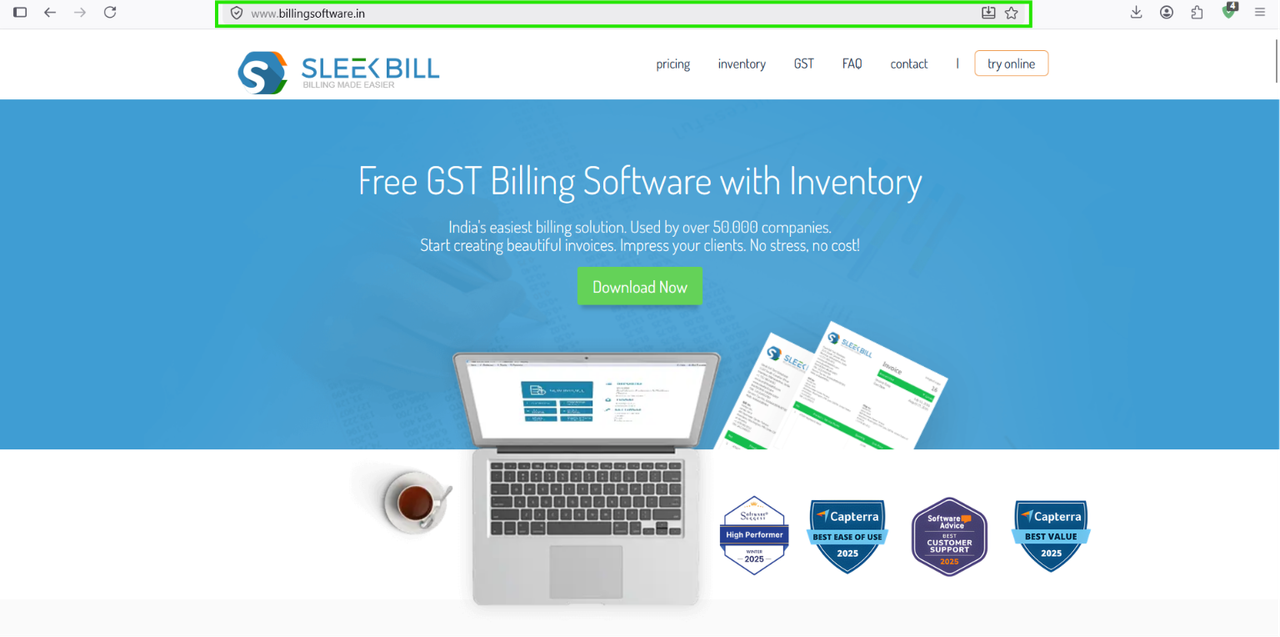
On the homepage, click the Download Now button to download the latest version of the Sleek Bill installer.
Step 2: Install the Software
Once the download is complete:
- Locate the downloaded .exe file in your Downloads folder.
- Double-click the installer to begin the installation process.
- Follow the on-screen installation wizard.
- Accept the license agreement and choose the installation location (or keep the default location).
- Click Install and wait for the installation to finish.
The installation usually takes only a few minutes.
Step 3: Launch Sleek Bill
After the installation is complete, Sleek Bill will launch automatically.
You can also open the software anytime by double-clicking the Sleek Bill shortcut on your desktop or by searching for it in the Windows Start menu.
Troubleshooting Tip: Windows SmartScreen Warning
Some Windows systems may display a Windows SmartScreen security warning when running the installer. This is a standard Windows security feature.
If you see this message:
- Click More info.
- Select Run anyway.
- Continue with the installation.
The installation will proceed normally.
You're Ready to Start Billing
Once installed, you can begin creating professional invoices, managing customers, tracking inventory, generating GST reports, and using all the powerful features Sleek Bill offers to simplify your business billing.
With just three simple steps—Download, Install, and Launch—you'll be ready to manage your business more efficiently.
Was this article helpful?