🧾 Billing & Invoicing
How to Use Customer Credits in Invoice in Sleek Bill Online
If a customer has previously paid more than the invoice amount, the extra payment is automatically stored as Customer Credits
in Sleek Bill Online. Instead of refunding the excess amount, you can
easily adjust these credits against the customer's next invoice. But also Advance Payments and Credit Notes
against future invoices. Whenever a customer has an available credit
balance, you can easily apply it while creating a new invoice.
When Are Customer Credits Created?
Customer credits are created when a customer pays more than the outstanding invoice amount. The excess amount is automatically saved as available credit in the customer's account and can be used for future invoices.
Example:
- Invoice Amount: ₹8,000
- Customer Payment: ₹10,000
- Excess Payment: ₹2,000
The additional ₹2,000 is stored as customer credit and can be adjusted in the next invoice.
Steps to Use Customer Credits in Sleek Bill
Step 1 : Open your browser and type www.sleekbill.in, then press Enter. Click on the Login button at the top right corner. Step 2 : After logging in, go to the Dashboard. Navigate to Invoices.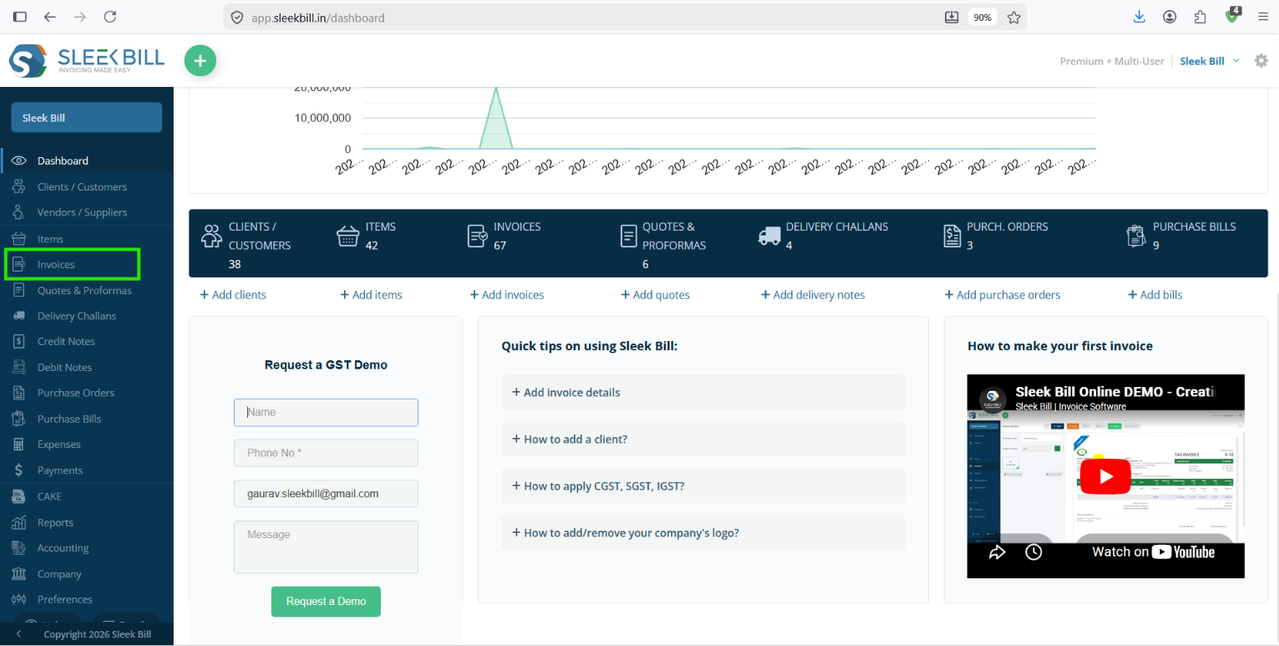
Step 3 : Select Tax Invoice create a new invoice for the same client who has available credits.

Step 4 : After selecting the client, complete the invoice by adding the required products or services.
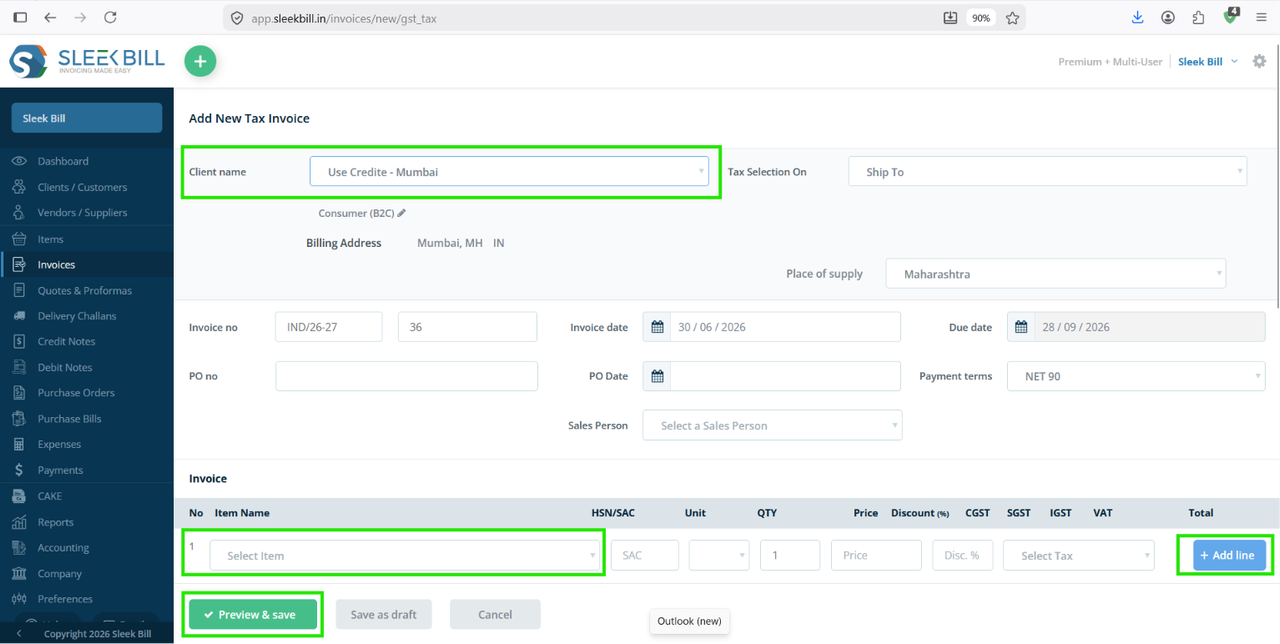
Step 5 : A notification appears at the top of the invoice preview informing you that customer credits are available for adjustment.

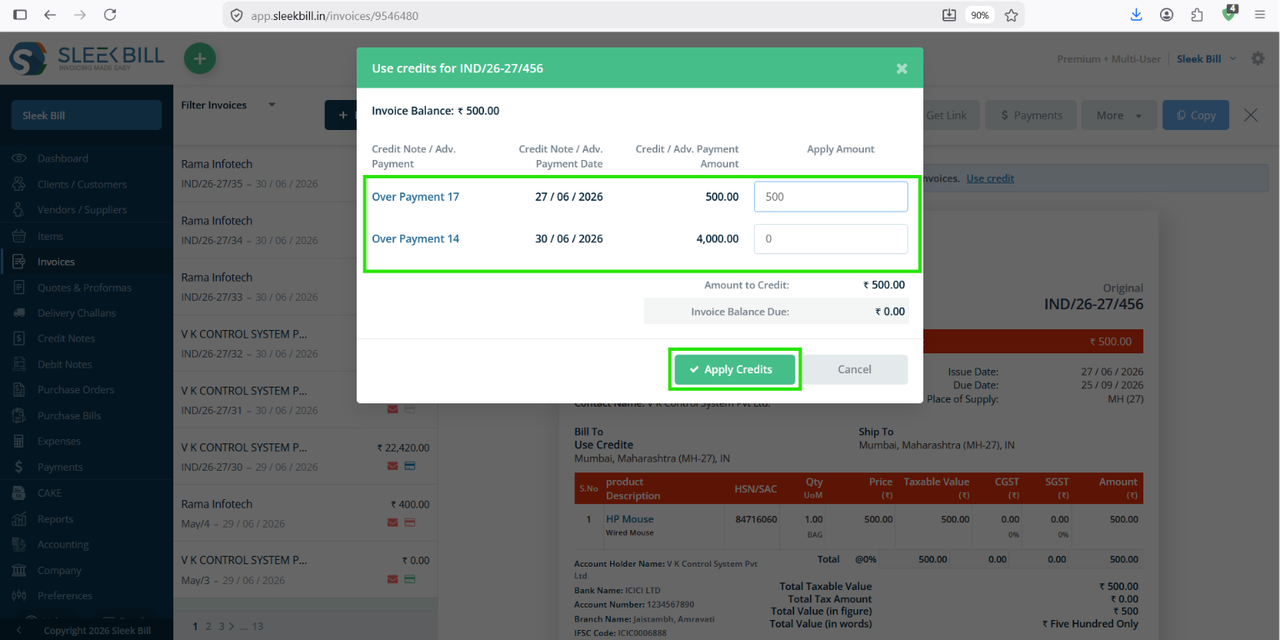
Step 6 : Click the Use Credits button displayed in the notification.
Step 7 : In the popup window, you will see the invoices or payment entries from which the credits are available. Tick the checkbox next to the credit entry that you want to use for the current invoice. You can select one or multiple available credits, depending on the amount you want to adjust. After selecting the required credits, click Apply. Sleek Bill Online automatically adjusts the selected credit amount against the current invoice.
Benefits of Using Customer Credits in Sleek Bill
- Keeps customer accounts accurate.
- Prevents duplicate payment entries.
- Makes advance payment adjustments simple.
- Easily manages returned goods using credit notes.
- Improves payment tracking.
- Maintains complete transaction history.
- Reduces manual calculations and errors.
Best Practices
- Always record advance payments as customer credits instead of creating temporary invoices.
- Issue credit notes only for valid returns or invoice corrections.
- Verify the available customer credit before creating a new invoice.
- Keep payment references for easy reconciliation.
- Review customer ledgers regularly to ensure accurate balances.
Was this article helpful?